Expense Report Form Template

Expense Report Form Template

Expense Report Form Template

Expense reports shouldn't be a punishment. Make them painless for everyone—employees, managers, and finance.

Expense reports shouldn't be a punishment. Make them painless for everyone—employees, managers, and finance.

Expense reports shouldn't be a punishment. Make them painless for everyone—employees, managers, and finance.

Sign up for more awesome templates.
*FREE No Credit Card Required
Expense Report Template

Trusted by

About this template

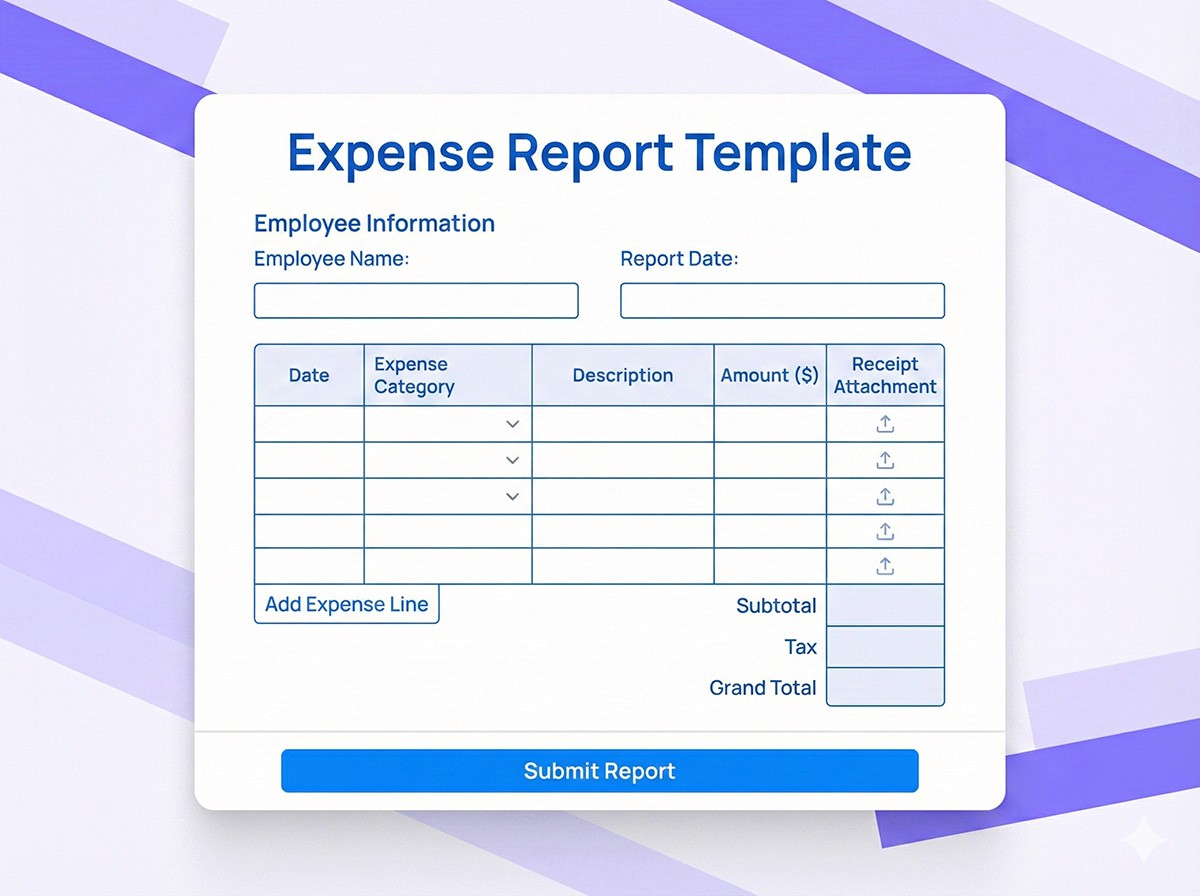
Let's be honest: expense reports are nobody's favorite task. Employees lose receipts, managers spend hours deciphering handwritten notes, and finance teams manually enter everything into accounting software. It's a time-sink that creates frustration at every level. This expense report template changes that. Employees snap photos of receipts with their phone, categorize expenses with a few taps, and submit in minutes, not hours. No more digging through wallets for crumpled receipts or trying to remember what that $47 charge was for three weeks ago.

The form is smart about the details that matter. It automatically calculates totals, tracks mileage with GPS integration, applies per diem rates based on location, and flags expenses that need manager approval. Managers get a clean, organized view of all expenses with receipts attached, making approval decisions fast and informed. Finance teams receive structured data that exports directly to QuickBooks, Xero, or your accounting system, no manual data entry required. Plus, everything is stored in one place with timestamps and approval chains, creating a complete audit trail for tax season and compliance audits.

FAQs

FAQs

FAQs

We’ve got the answers

What is an expense report example?

An expense report example typically includes: date, expense category (travel, meals, supplies), vendor name, amount, business purpose, and receipt. This template provides a structured format that ensures all necessary information is captured, making it easy for employees to submit and managers to approve expenses.

What is an expense report example?

An expense report example typically includes: date, expense category (travel, meals, supplies), vendor name, amount, business purpose, and receipt. This template provides a structured format that ensures all necessary information is captured, making it easy for employees to submit and managers to approve expenses.

What is an expense report example?

An expense report example typically includes: date, expense category (travel, meals, supplies), vendor name, amount, business purpose, and receipt. This template provides a structured format that ensures all necessary information is captured, making it easy for employees to submit and managers to approve expenses.

How do I create an expense report template in Google Sheets?

While you can create expense reports in Google Sheets, this Formflow template offers advantages like mobile receipt uploads, automated calculations, approval workflows, and direct integration with accounting software. However, you can export data from this form to Google Sheets if needed.

How do I create an expense report template in Google Sheets?

While you can create expense reports in Google Sheets, this Formflow template offers advantages like mobile receipt uploads, automated calculations, approval workflows, and direct integration with accounting software. However, you can export data from this form to Google Sheets if needed.

How do I create an expense report template in Google Sheets?

While you can create expense reports in Google Sheets, this Formflow template offers advantages like mobile receipt uploads, automated calculations, approval workflows, and direct integration with accounting software. However, you can export data from this form to Google Sheets if needed.

Can I upload receipt photos with my expense report?

Absolutely. The form includes file upload fields that allow you to attach photos of receipts directly from your phone or upload PDF files. Receipts are automatically attached to each expense line item, making it easy for managers and finance to verify expenses.

Can I upload receipt photos with my expense report?

Absolutely. The form includes file upload fields that allow you to attach photos of receipts directly from your phone or upload PDF files. Receipts are automatically attached to each expense line item, making it easy for managers and finance to verify expenses.

Can I upload receipt photos with my expense report?

Absolutely. The form includes file upload fields that allow you to attach photos of receipts directly from your phone or upload PDF files. Receipts are automatically attached to each expense line item, making it easy for managers and finance to verify expenses.

How does mileage tracking work in expense reports?

The form can include mileage tracking fields where you enter your starting and ending locations or odometer readings. Some integrations can automatically calculate mileage using GPS data. The form then calculates reimbursement based on your company's mileage rate (typically the IRS standard rate).

How does mileage tracking work in expense reports?

The form can include mileage tracking fields where you enter your starting and ending locations or odometer readings. Some integrations can automatically calculate mileage using GPS data. The form then calculates reimbursement based on your company's mileage rate (typically the IRS standard rate).

How does mileage tracking work in expense reports?

The form can include mileage tracking fields where you enter your starting and ending locations or odometer readings. Some integrations can automatically calculate mileage using GPS data. The form then calculates reimbursement based on your company's mileage rate (typically the IRS standard rate).

Can this expense report integrate with QuickBooks?

Yes. Formflow integrates with QuickBooks and other accounting software via webhooks and API connections. Approved expense reports can automatically sync to your accounting system, eliminating manual data entry and reducing errors.

Can this expense report integrate with QuickBooks?

Yes. Formflow integrates with QuickBooks and other accounting software via webhooks and API connections. Approved expense reports can automatically sync to your accounting system, eliminating manual data entry and reducing errors.
Can this expense report integrate with QuickBooks?

Yes. Formflow integrates with QuickBooks and other accounting software via webhooks and API connections. Approved expense reports can automatically sync to your accounting system, eliminating manual data entry and reducing errors.

Similar templates