Invoice Form Template

Invoice Form Template

Invoice Form Template

Stop losing money to slow invoicing. Get paid faster with professional invoices that look great and work perfectly.

Stop losing money to slow invoicing. Get paid faster with professional invoices that look great and work perfectly.

Stop losing money to slow invoicing. Get paid faster with professional invoices that look great and work perfectly.

Sign up for more awesome templates.
*FREE No Credit Card Required
Invoice Template
Invoice Template
Invoice Template

Trusted by

About this template

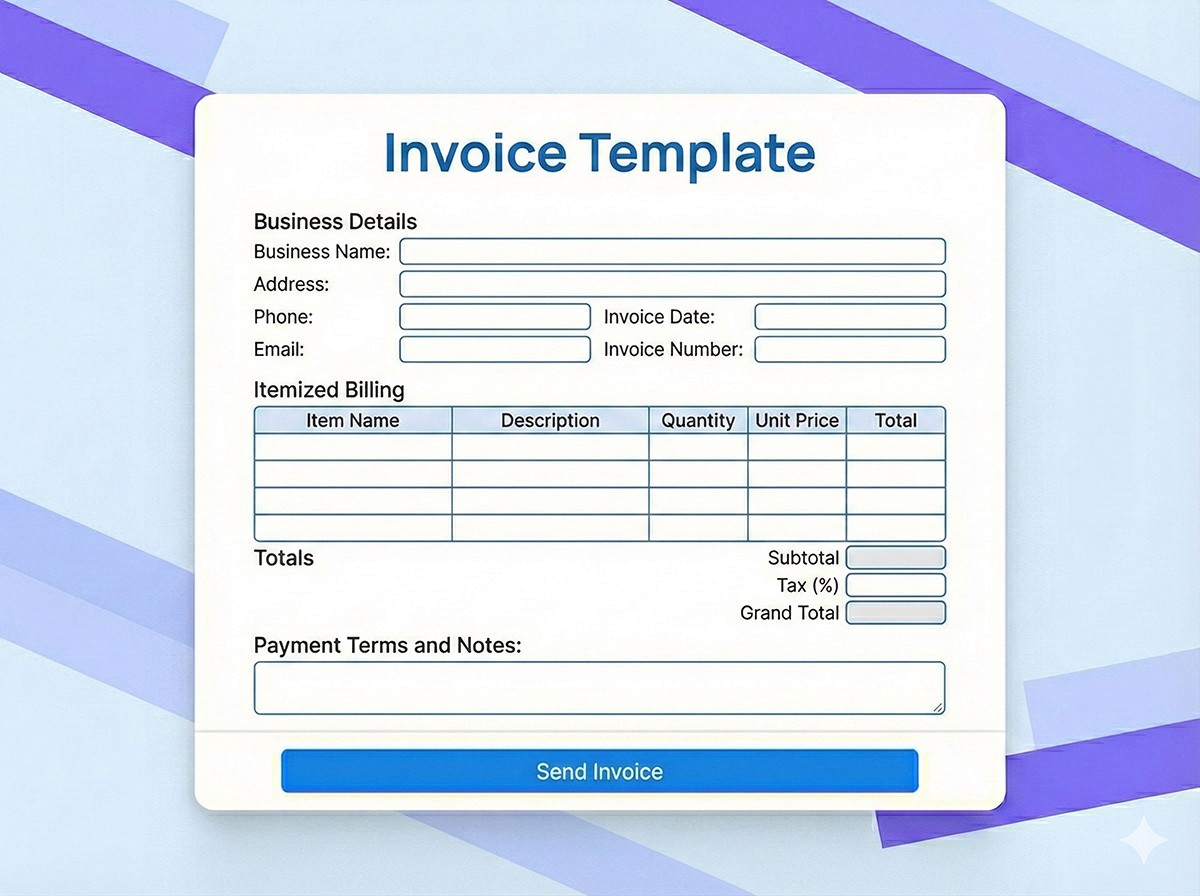
You finished a project. Now you need to invoice the client. You open Word, try to remember what an invoice should look like, manually calculate totals, and hope you didn't make any math errors. Then you email it and wait. And wait. Weeks later, you're following up because you're not sure if they received it or if they're just ignoring it. This invoice template eliminates all that friction. Create professional invoices in minutes with your branding, automatic calculations, and clear payment terms. Email invoices directly to clients with one click, and track who's paid and who hasn't in your dashboard.

The template is designed to get you paid faster. Professional design builds trust with clients. Clear itemization shows exactly what they're paying for. Automatic tax calculations ensure accuracy. Payment terms are clearly stated. And automated reminders can nudge clients when invoices are approaching due dates or become overdue. Every invoice is stored in your dashboard with payment status tracking, so you always know your accounts receivable at a glance. Export data to QuickBooks or your accounting software, or generate reports for tax season. Plus, the mobile-friendly design means you can create and send invoices from anywhere whether you're at your desk or on the go.

FAQs

FAQs

FAQs

We’ve got the answers

What is an invoice template?

An invoice template is a pre-built form used to create professional invoices for services or products you've provided to clients. It includes fields for your business information, client details, itemized charges, taxes, totals, and payment terms.

What is an invoice template?

An invoice template is a pre-built form used to create professional invoices for services or products you've provided to clients. It includes fields for your business information, client details, itemized charges, taxes, totals, and payment terms.

What is an invoice template?

An invoice template is a pre-built form used to create professional invoices for services or products you've provided to clients. It includes fields for your business information, client details, itemized charges, taxes, totals, and payment terms.

How do I create an invoice template?

Creating an invoice template is simple with this form. Add your business logo and information, customize fields to match your needs (services, products, hourly rates, etc.), set up automatic tax calculations, and save it as a template. Then you can create new invoices quickly by filling in client details and line items.

How do I create an invoice template?

Creating an invoice template is simple with this form. Add your business logo and information, customize fields to match your needs (services, products, hourly rates, etc.), set up automatic tax calculations, and save it as a template. Then you can create new invoices quickly by filling in client details and line items.

How do I create an invoice template?

Creating an invoice template is simple with this form. Add your business logo and information, customize fields to match your needs (services, products, hourly rates, etc.), set up automatic tax calculations, and save it as a template. Then you can create new invoices quickly by filling in client details and line items.

Can I email invoices directly to clients?

Yes. The form allows you to email invoices directly to clients immediately after creation. Clients receive a professional PDF invoice in their inbox, and you get delivery confirmation. This eliminates the need to manually attach and send invoices.

Can I email invoices directly to clients?

Yes. The form allows you to email invoices directly to clients immediately after creation. Clients receive a professional PDF invoice in their inbox, and you get delivery confirmation. This eliminates the need to manually attach and send invoices.

Can I email invoices directly to clients?

Yes. The form allows you to email invoices directly to clients immediately after creation. Clients receive a professional PDF invoice in their inbox, and you get delivery confirmation. This eliminates the need to manually attach and send invoices.

What's the difference between an invoice and a receipt?

An invoice is sent before payment and requests payment for goods or services. A receipt is sent after payment and confirms that payment was received. Invoices are for billing; receipts are for documentation. This template is for creating invoices to request payment.

What's the difference between an invoice and a receipt?

An invoice is sent before payment and requests payment for goods or services. A receipt is sent after payment and confirms that payment was received. Invoices are for billing; receipts are for documentation. This template is for creating invoices to request payment.

What's the difference between an invoice and a receipt?

An invoice is sent before payment and requests payment for goods or services. A receipt is sent after payment and confirms that payment was received. Invoices are for billing; receipts are for documentation. This template is for creating invoices to request payment.

Can this invoice template track payment status?

Yes. The template includes payment status tracking. You can mark invoices as sent, viewed, paid, or overdue. Set up automated reminders for approaching due dates or overdue invoices to help ensure timely payment.
Can this invoice template track payment status?

Yes. The template includes payment status tracking. You can mark invoices as sent, viewed, paid, or overdue. Set up automated reminders for approaching due dates or overdue invoices to help ensure timely payment.
Can this invoice template track payment status?

Yes. The template includes payment status tracking. You can mark invoices as sent, viewed, paid, or overdue. Set up automated reminders for approaching due dates or overdue invoices to help ensure timely payment.

Similar templates