Referral Form Template

Referral Form Template

Referral Form Template

Collect quality referrals and generate leads with our professional referral form template.

Collect quality referrals and generate leads with our professional referral form template.

Collect quality referrals and generate leads with our professional referral form template.

Sign up for more awesome templates.
*FREE No Credit Card Required
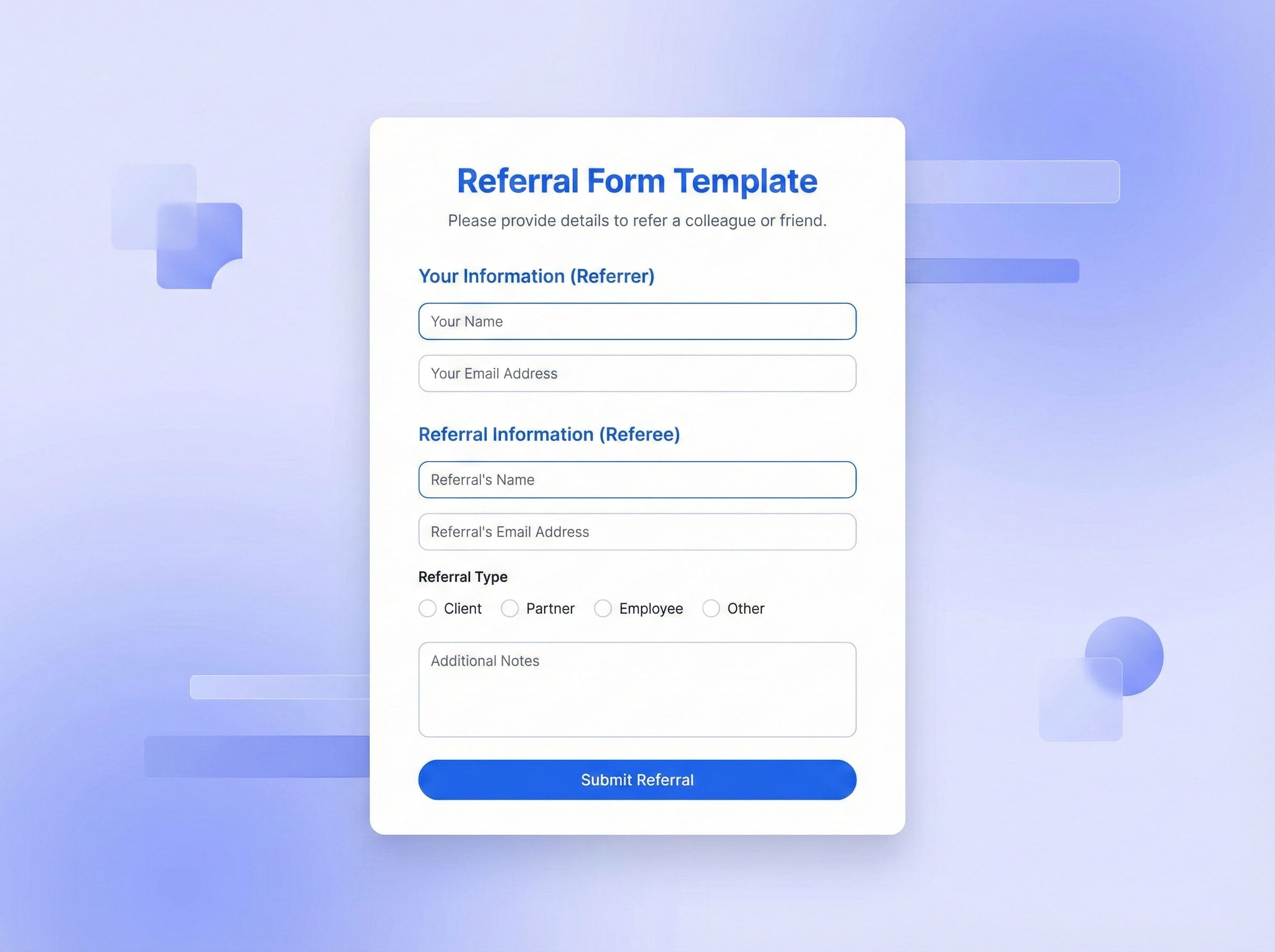
Referral Form Template

Trusted by

About this template

Our referral form template helps businesses, service providers, and organizations capture qualified leads through customer and partner referrals. This template is perfect for B2B companies, professional services, recruitment agencies, real estate businesses, and any organization with a referral program.

The template enables you to collect essential referral information including referrer details, referred contact information, relationship between referrer and referral, referral reason or context, and preferred contact method. With Formflow's free form builder, you can customize the template to match your referral program structure, add conditional logic to show different questions based on referral source, and include fields for tracking referral codes or incentives.

Using Formflow's drag-and-drop visual workflow builder, you can create professional referral forms without coding knowledge. The template supports real-time email validation, branching questions, and can be hosted as a standalone form or embedded directly into your website. You can set up automatic email notifications for new referrals, integrate with CRM systems, and track referral sources through built-in analytics, helping you measure program effectiveness and reward successful referrers.

FAQs

FAQs

FAQs

We’ve got the answers

How do I incentivize referrals through forms?

You can incentivize referrals by including referral code fields, tracking referrer information, and setting up automated reward systems. Formflow allows you to add conditional fields that capture referral codes, track which referrer generated each lead, and integrate with reward platforms. You can configure the form to automatically notify both the referrer and your team when a successful referral is submitted, enabling timely reward processing and maintaining referrer engagement.

How do I incentivize referrals through forms?

You can incentivize referrals by including referral code fields, tracking referrer information, and setting up automated reward systems. Formflow allows you to add conditional fields that capture referral codes, track which referrer generated each lead, and integrate with reward platforms. You can configure the form to automatically notify both the referrer and your team when a successful referral is submitted, enabling timely reward processing and maintaining referrer engagement.

How do I incentivize referrals through forms?

You can incentivize referrals by including referral code fields, tracking referrer information, and setting up automated reward systems. Formflow allows you to add conditional fields that capture referral codes, track which referrer generated each lead, and integrate with reward platforms. You can configure the form to automatically notify both the referrer and your team when a successful referral is submitted, enabling timely reward processing and maintaining referrer engagement.

What information should I collect in a referral form?

A referral form should collect the referrer's contact information, the referred person's details including name, email, phone, and company, the relationship between referrer and referral, context about why they're being referred, preferred contact method, and any relevant background information. Include fields for referral codes, program terms acknowledgment, and consent for contact. This information helps you qualify leads, understand referral context, and follow up appropriately with both parties.

What information should I collect in a referral form?

A referral form should collect the referrer's contact information, the referred person's details including name, email, phone, and company, the relationship between referrer and referral, context about why they're being referred, preferred contact method, and any relevant background information. Include fields for referral codes, program terms acknowledgment, and consent for contact. This information helps you qualify leads, understand referral context, and follow up appropriately with both parties.

What information should I collect in a referral form?

A referral form should collect the referrer's contact information, the referred person's details including name, email, phone, and company, the relationship between referrer and referral, context about why they're being referred, preferred contact method, and any relevant background information. Include fields for referral codes, program terms acknowledgment, and consent for contact. This information helps you qualify leads, understand referral context, and follow up appropriately with both parties.

Can referral forms integrate with CRM systems?

Yes, Formflow supports integration with popular CRM systems including Salesforce, HubSpot, Pipedrive, and Zapier, allowing you to automatically sync referral submissions to your CRM. When a referral is submitted, the data can be automatically created as a new lead or contact, assigned to the appropriate sales representative, tagged with referral source information, and trigger follow-up workflows. This integration eliminates manual data entry and ensures no referrals are missed.

Can referral forms integrate with CRM systems?

Yes, Formflow supports integration with popular CRM systems including Salesforce, HubSpot, Pipedrive, and Zapier, allowing you to automatically sync referral submissions to your CRM. When a referral is submitted, the data can be automatically created as a new lead or contact, assigned to the appropriate sales representative, tagged with referral source information, and trigger follow-up workflows. This integration eliminates manual data entry and ensures no referrals are missed.

Can referral forms integrate with CRM systems?

Yes, Formflow supports integration with popular CRM systems including Salesforce, HubSpot, Pipedrive, and Zapier, allowing you to automatically sync referral submissions to your CRM. When a referral is submitted, the data can be automatically created as a new lead or contact, assigned to the appropriate sales representative, tagged with referral source information, and trigger follow-up workflows. This integration eliminates manual data entry and ensures no referrals are missed.

How do I track referral form performance?

Formflow provides built-in analytics to track referral form performance including submission rates, conversion rates, referrer effectiveness, and referral sources. You can view real-time dashboards showing which referrers generate the most leads, track referral-to-customer conversion rates, identify peak submission times, and measure overall program ROI. Export data to analyze trends, identify top referrers for rewards, and optimize your referral program based on data-driven insights.

How do I track referral form performance?

Formflow provides built-in analytics to track referral form performance including submission rates, conversion rates, referrer effectiveness, and referral sources. You can view real-time dashboards showing which referrers generate the most leads, track referral-to-customer conversion rates, identify peak submission times, and measure overall program ROI. Export data to analyze trends, identify top referrers for rewards, and optimize your referral program based on data-driven insights.

How do I track referral form performance?

Formflow provides built-in analytics to track referral form performance including submission rates, conversion rates, referrer effectiveness, and referral sources. You can view real-time dashboards showing which referrers generate the most leads, track referral-to-customer conversion rates, identify peak submission times, and measure overall program ROI. Export data to analyze trends, identify top referrers for rewards, and optimize your referral program based on data-driven insights.

What makes a referral form effective?

An effective referral form is simple, quick to complete, mobile-friendly, and clearly communicates the referral program benefits. It should collect essential information without being overwhelming, include clear instructions, provide immediate confirmation, and offer transparency about next steps. Using Formflow's conditional logic, you can create smart forms that show relevant questions based on referral type, reducing completion time while gathering necessary details. The form should also integrate seamlessly with your follow-up process to ensure timely lead nurturing.
What makes a referral form effective?

An effective referral form is simple, quick to complete, mobile-friendly, and clearly communicates the referral program benefits. It should collect essential information without being overwhelming, include clear instructions, provide immediate confirmation, and offer transparency about next steps. Using Formflow's conditional logic, you can create smart forms that show relevant questions based on referral type, reducing completion time while gathering necessary details. The form should also integrate seamlessly with your follow-up process to ensure timely lead nurturing.
What makes a referral form effective?

An effective referral form is simple, quick to complete, mobile-friendly, and clearly communicates the referral program benefits. It should collect essential information without being overwhelming, include clear instructions, provide immediate confirmation, and offer transparency about next steps. Using Formflow's conditional logic, you can create smart forms that show relevant questions based on referral type, reducing completion time while gathering necessary details. The form should also integrate seamlessly with your follow-up process to ensure timely lead nurturing.

Similar templates