Formflow allows you to enable Numeric Scoring and Custom Scoring at the same time.
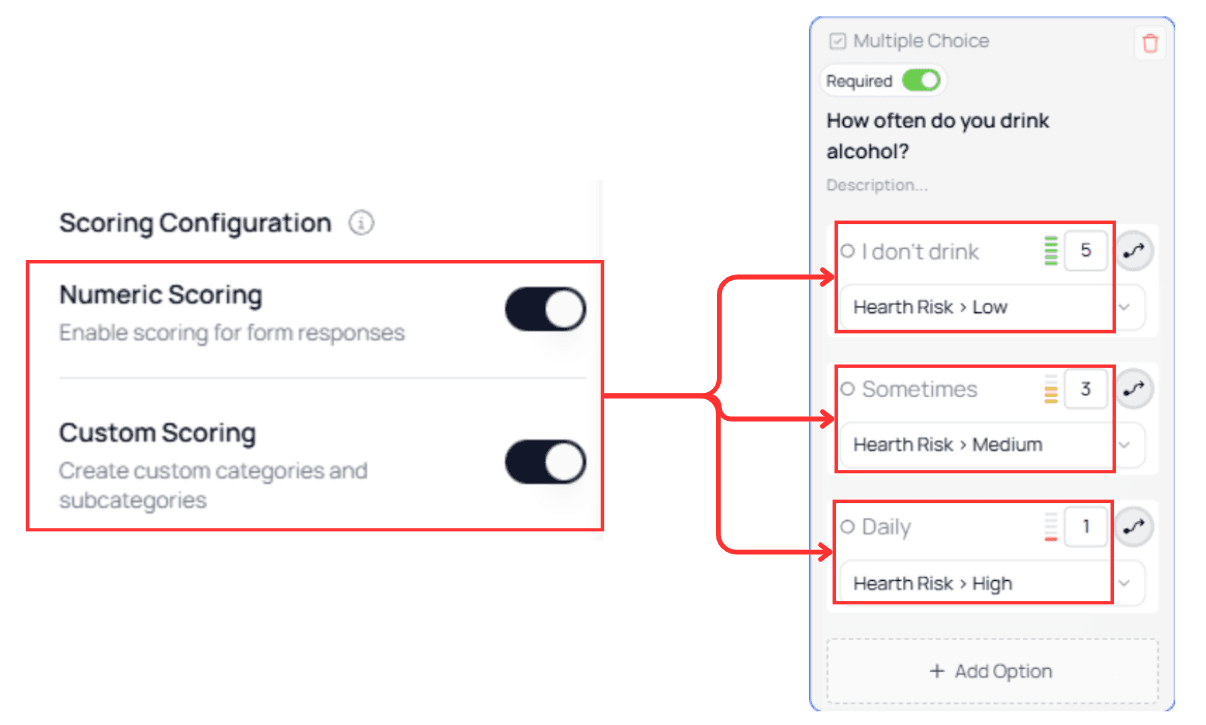
When both options are active, each answer choice can include:
a numeric value, and
a category or subcategory
This gives you full flexibility to build more advanced scoring evaluations, such as:
Hybrid quizzes
Multi-factor risk assessments
Recommendations that depend on both score totals and category patterns
Personality profiles with numerical weighting
How Combined Scoring Works
Once both scoring types are toggled on in the Scoring Configuration panel, options inside Dropdown and Multiple Choice nodes will display:
a numeric input field
a category/subcategory selector
This means a single user selection updates two independent scoring models:
Numeric Scoring → contributes to Total Score
Custom Scoring → assigns the selection to a category/subcategory
⚠️ Important:
Numeric Scoring and Custom Scoring are calculated separately.
They do not merge into a single combined score.
Example Structure
In the illustrated example, each option:
has a numeric value (e.g., 5, 3, 1), and
is assigned to a category with a subcategory (e.g., Category → Low / Medium / High)
This demonstrates how both systems can operate at the same time on the same option.
💡 Tip:
Use Numeric Scoring to measure quantity or severity, and Custom Scoring to classify type, group, or profile.
Related Scoring Documentation
To better understand each scoring type before combining them, you can review the individual scoring guides:
These pages explain how each system works independently and provide the foundation for using both scoring types together.